Introduction
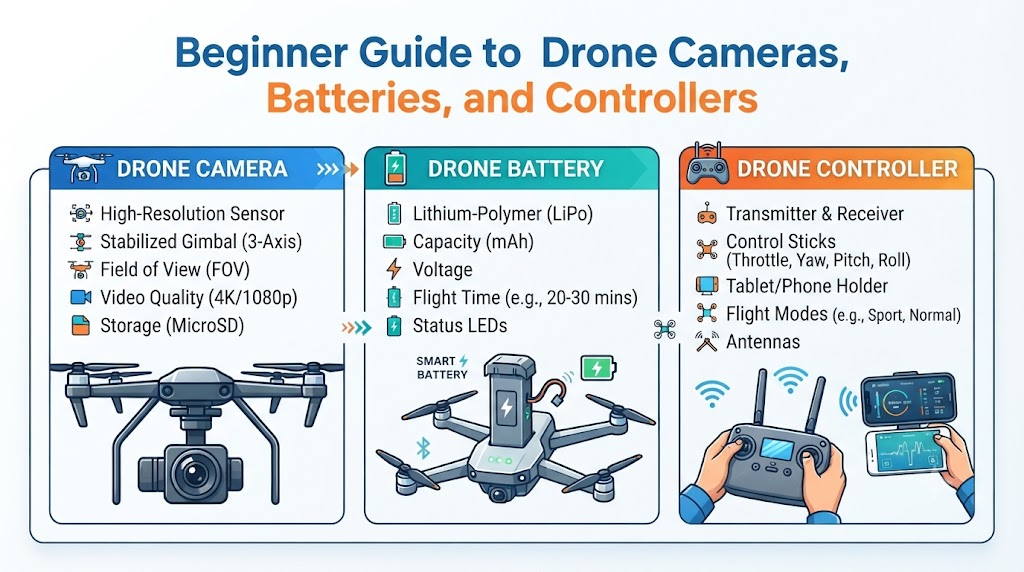
Learning about drones is exciting. A drone needs several parts to capture images and fly under control. The camera, battery, and controller are three important parts of many camera drones. Understanding these parts can help you choose and use a drone with more confidence. Drone Cameras, Batteries, and Controllers work as a team to make every flight possible.
Understanding the Main Parts of a Drone
A drone relies on several core components to operate smoothly in the air. The camera is the part that captures photos or videos. The battery provides power to the drone. The controller is the device a pilot uses to guide the drone. Some drones use a phone or tablet with a controller. Others use different control systems. Keeping these roles clear helps new pilots understand the basics.
A Beginner Guide to Drone Cameras
Drone cameras capture unique views from the air. Camera features matter for travel videos, family photos, creative work, and simple aerial shots. Knowing how these lenses and sensors work helps you pick the right model.
Camera Resolution
Resolution describes the amount of detail in an image. Common labels include Full HD and 4K in simple words. Higher resolution can capture more detail, but it does not guarantee better image quality.
Photo and Video Quality
Image sensors, lenses, light, and camera settings affect results. You should check real sample photos or videos when available. Resolution alone does not decide camera quality.
Gimbals and Image Stability
A gimbal helps keep the camera steady. Stable footage matters when a drone moves or faces light wind. Some drones use built-in gimbals, while others use different ways to steady images.
Camera Movement and Angles
Camera angles can change the look of a photo or video. Features such as camera tilt help frame your shots when supported by the model. Check the actual camera controls before buying.
Camera Features Beginners Should Check
Useful features include photo modes, video settings, storage support, and camera movement. Choose features that match your goals. Not every beginner needs a professional camera setup.
A Beginner Guide to Drone Batteries
A drone battery supplies power to its motors, camera, and other parts. Battery choice affects flight time, weight, and overall performance.
Drone Battery Types
Many small drones use lithium-based rechargeable batteries. Some models use lithium-polymer or LiPo batteries. LiPo is a type of rechargeable battery often used in drones. Not every drone uses the same battery type.
Battery Capacity and Flight Time
Battery capacity tells users how much energy a battery can store. mAh is a unit used to show battery capacity. A larger capacity does not always mean longer flight time. Battery weight and drone design also matter.
Battery Charging Time
Charging time depends on the battery and approved charger. Follow the manufacturer’s charging instructions closely. Do not assume a single charging time applies to all drones.
How to Care for a Drone Battery
Inspect batteries for swelling, cracks, leaks, or unusual heat. Use a compatible charger and avoid damaged batteries. Keep batteries away from water, fire, and extreme heat. Do not leave charging batteries unattended unless the manufacturer’s instructions allow it.
Signs of a Battery Problem
Warning signs include swelling, physical damage, unusual heat, or sudden drops in performance. Stop using a damaged battery immediately. Follow the manufacturer’s safety guidance and never open or puncture a damaged battery.
A Beginner Guide to Drone Controllers
A controller sends commands to the drone. It helps pilots guide movement and manage supported camera features safely.
Joysticks and Basic Controls
Joysticks control the drone’s movement. Common movements include rising, descending, turning, and moving forward or sideways. Stick layouts can vary by control mode and drone model. Read the manual before your first flight.
Buttons and Camera Controls
Controllers may have buttons for taking photos, recording videos, or changing camera angles. Exact controls vary by model. Encourage yourself to learn each button before flying outdoors.
Phone-Based and Screen Controllers
Some controllers hold a phone or tablet. Others have a built-in screen. A phone-based setup may use a device you already own. A screen controller offers a dedicated display. Check compatibility before choosing either option.
Signal Range and Connection
A controller needs a reliable connection to guide the drone. Advertised range can differ from real-world results. Buildings, interference, local rules, and the drone’s design can affect connection quality.
How Drone Cameras, Batteries, and Controllers Work Together
The three parts support one flight. The battery provides power. The controller sends commands. The camera captures images or video. All three parts must suit your specific needs.
Imagine a beginner filming a landscape. The pilot checks the battery, tests the controls, and sets the camera before takeoff. A good camera cannot replace safe flying skills and proper preparation.
How to Choose the Right Features for Your Needs
Beginners can choose a drone based on their main goal. Matching features to your activity ensures a smooth experience.
For Travel and Outdoor Photos
Focus on camera quality, portability, stable footage, and practical flight time. Weight and easy setup matter for travelers.
For Learning and Practice
Focus on easy controls, clear instructions, basic safety features, and reasonable replacement costs. Beginners benefit from a simple model.
For Video Creation
Focus on video quality, camera stability, storage, and camera controls. Lighting and flying skills also affect the final video.
For Longer Projects
Some users may need extra batteries or charging options. Check compatibility and safe storage rules before buying additional gear.
Common Mistakes Beginners Should Avoid
New pilots often make avoidable errors. Knowing what to watch out for keeps your drone safe.
- Choosing a drone based only on camera resolution. Check all features instead.
- Assuming advertised flight time is always realistic. Plan for shorter flights.
- Buying an incompatible battery or charger. Always verify official parts.
- Ignoring controller instructions. Read the manual first.
- Forgetting to check propellers and battery condition. Inspect parts before every launch.
- Flying before learning basic controls. Practice in an open, safe area.
- Ignoring local flight rules. Stay updated on aviation guidelines.
- Taking off without checking surroundings. Clear the takeoff zone completely.
A Simple Pre-Flight Checklist for Beginners
Follow this practical checklist before every flight:
- Inspect the drone and propellers for damage.
- Check the battery for cracks or wear.
- Confirm that the battery has enough charge.
- Check the controller and connection status.
- Confirm that the camera works as expected.
- Review weather and wind conditions.
- Check the flying area and nearby people.
- Confirm applicable flight rules and permissions.
- Read and follow the drone manufacturer’s instructions.
How DronesBee Can Help Beginners Learn About Drones
DronesBee.com provides helpful resources for aviation enthusiasts. You can explore guides, product details, and informative articles to expand your knowledge. Reviewing verified guides helps you make smart choices before buying equipment. Explore the platform to learn more about safe drone operation.
Frequently Asked Questions
1. What are the main parts of a camera drone?
The main parts include the frame, motors, propellers, camera, battery, and controller.
2. How does a drone camera work?
A digital sensor captures light passing through the lens and saves it as photos or video files.
3. What camera resolution should a beginner choose?
Full HD or 4K resolution works well for most beginners depending on their display needs.
4. How long can a drone battery last?
Most beginner drone batteries offer between fifteen and thirty minutes of flight time.
5. How should I charge a drone battery?
Always use the approved manufacturer charger in a safe, open area.
6. What does a drone controller do?
The controller transmits radio signals to guide the drone’s flight path and manage settings.
7. Can I use my phone with a drone controller?
Yes, many controllers use a clamped smartphone to display video feeds and flight maps.
8. Why does actual flight time differ from advertised flight time?
Wind, aggressive flying, temperature, and payload weight reduce actual battery endurance.
9. What should I check before flying a drone?
Check battery levels, propeller condition, weather, airspace rules, and surroundings.
10. How can DronesBee help beginners learn about drones?
DronesBee offers beginner guides, safety tips, and educational articles to support new pilots.
Conclusion
Drone cameras, batteries, and controllers form the backbone of modern aerial photography. Choose features based on your personal needs, budget, and skill level. Learn the controls, care for your battery properly, and follow safety rules on every outing. Explore DronesBee.com to discover more helpful guides for your next flight.
